

Open and edit an ODT file

The ODT extension designates text files that are based on the OASIS Open Document Format, or ODF for short. They are primarily used as a standard file format in the license-free office packages LibreOffice and OpenOffice. Since it is an internationally standardized format that was developed as an open source alternative to Microsoft Word, the ODT format can be opened with common desktop and online applications under Windows, Linux, Apple and on mobile devices.
- Simple registration
- Premium TLDs at great prices
- 24/7 personal consultant included
What is an ODT file?
The OpenDocument text format, abbreviated ODT, saw the light of day in the programming world with the development of the OpenDocument format (ODF). Created by Sun Microsystems, ODF was specified by the non-profit organization OASIS (Organization for the Advancement of Structured Information Standards) and further developed as an open-source file format. The OpenOffice XML Working Group, founded by OASIS in 2002, programmed ODF on an XML basis. In 2006, ODF was officially introduced as an international ISO/IEC 26300 standard.
The file extensions of ODF include the following file extensions:
ODT: text file
ODS: table file
ODP: presentation file
ODG: drawing/graphic/illustration
The ODT extension stands for text files of the ODF, which like other text file formats don’t only contain text, but also various metadata, formatting, images, and graphics. Since the evaluation of text files is done differently depending on the word processing program, there may be slight differences when opening an ODT file under Word. As a rule, ODT files are compatible with Microsoft Word, at least to a limited extent.
The advantage of ODT is that it is an open source, license-free text format that allows free, uncomplicated exchange between different applications and operating systems. Nevertheless, with important files you should always check whether there are changes in display and layout when opening them in licensed (i.e. paid) applications.
Open ODT format with these desktop applications
ODT is compatible with many word processing programs. This means that as an OpenOffice or LibreOffice user, for example, you can share an ODT file with Word users easily. The exception is Apple's Pages program, which does not have an import filter for the ODT format. Only Apple's Preview and TextEdit apps can open and edit an ODT file, but the formatting may be lost entirely.
Opening ODT on the desktop is possible with the following desktop applications:
- Apache OpenOffice and LibreOffice: License-free, free word alternatives that use ODT as the default file format and are available for Windows, Linux, and Mac.
- Microsoft Office with Word: Due to formatting differences, ODT has no problems but limited compatibility.
- Calligra Suite: Uses ODT as the default file format.
- AbiWord (for Linux): Limited compatibility.
- Google Drive: Limited compatibility.
- IBM Docs: Limited compatibility.
Opening, editing, and saving ODT files
Opening, editing, and saving OpenOffice text files with Word is also possible without problems, provided you use at least MS Office 2010. Older versions without service packs require the “ODF Add-In” for ODF. In addition, it should be noted that there are differences in formatting between the open source OpenOffice standard and the Word format (DOC or DOCX), and not all Word features are available under ODT. This can lead to a loss of formatting when opening in Word.
To open ODT in Word:
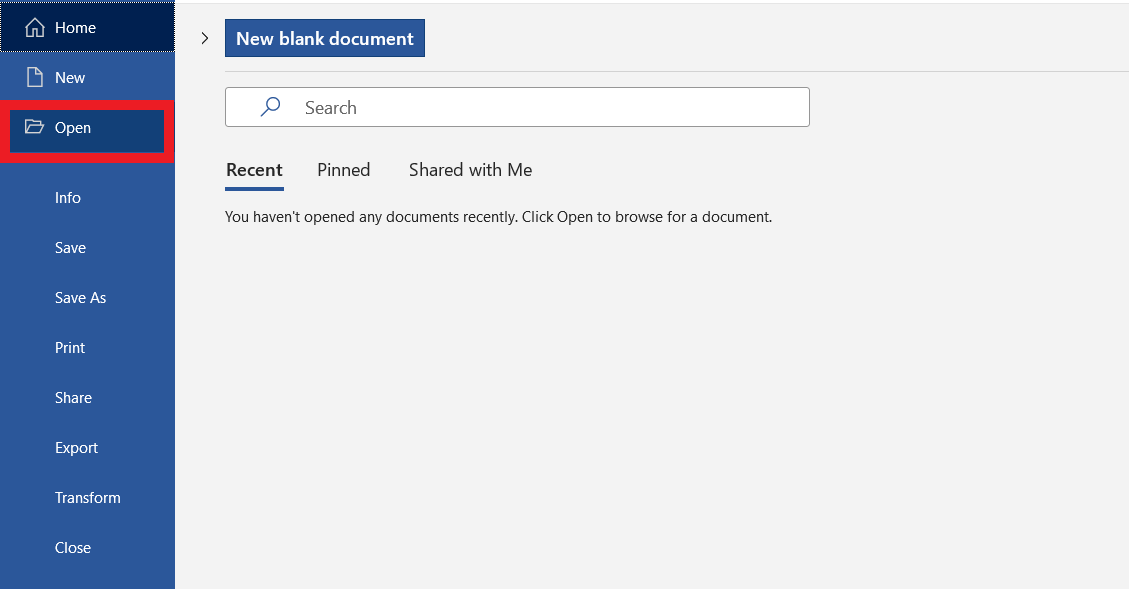
Step 1: Click “Open” under the “File” tab.
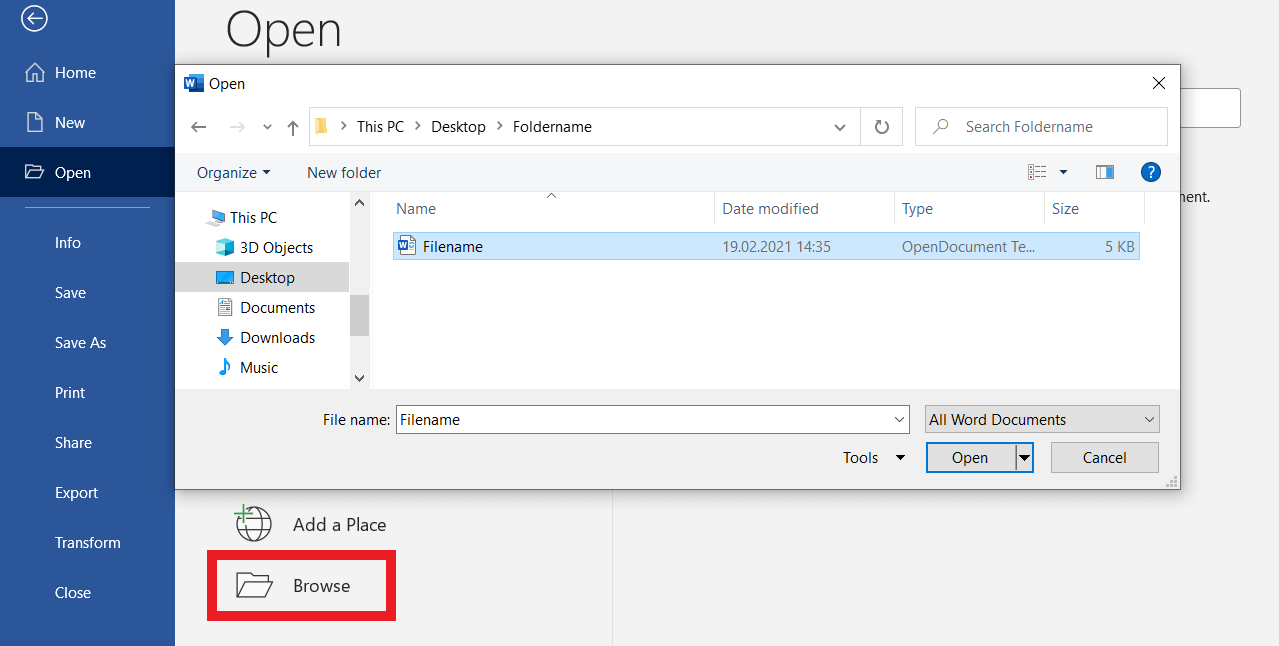
Step 2: Click “Browse” and double-click the ODT file to open and edit it in Word.
Here's how to convert an ODT file:
Step 1: Open the ODT file.
Step 2: Go to “File” and “Save As”.
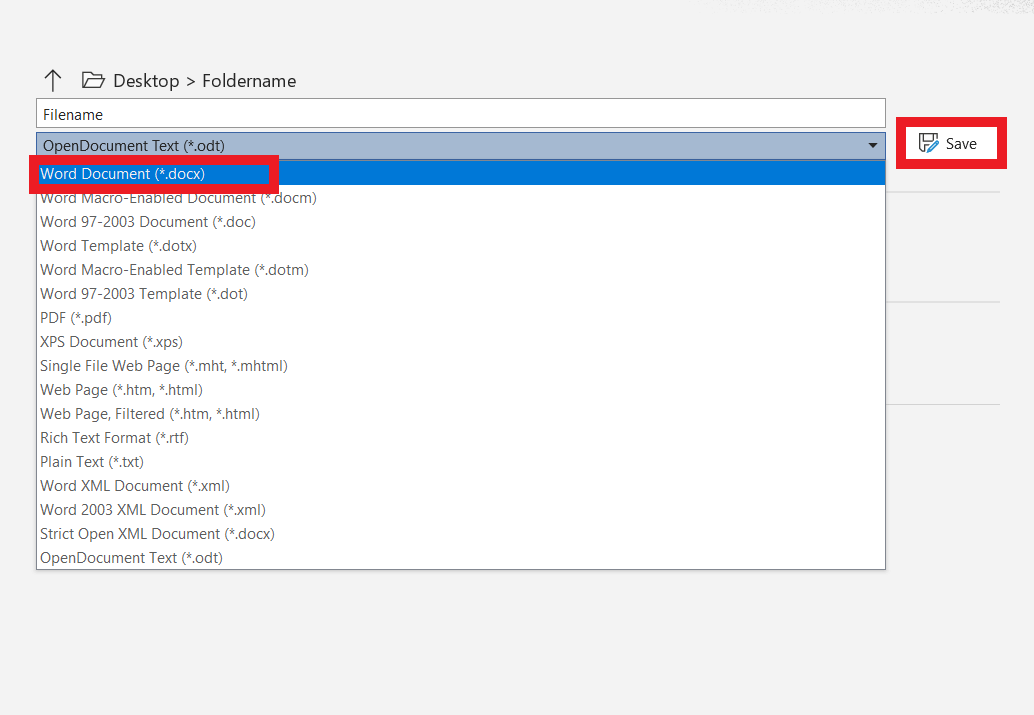
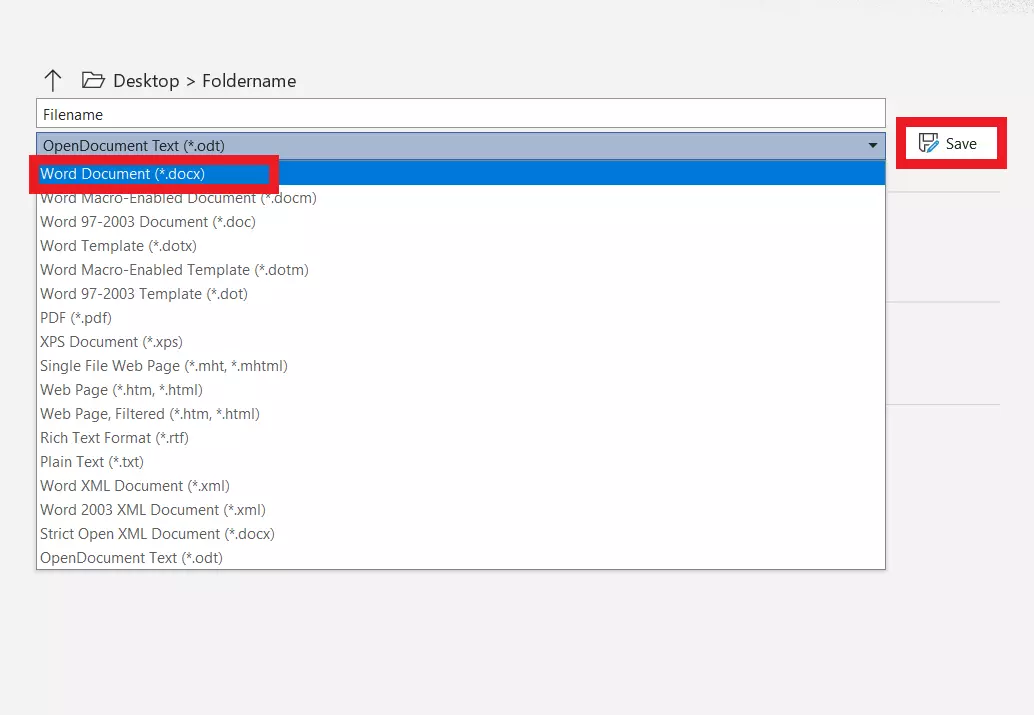
Step 3: Click the arrow in the file name field, select the format (e.g. DOC or DOCX), and click “Save” to convert the file.
Use the IONOS package Microsoft 365 with Office to save or convert ODT files. Although the free Word alternatives LibreOffice and OpenOffice are powerful equivalents to MS Word, they don't cover the full spectrum of professional word processing. Microsoft 365 with Office lets you use the latest installation, store data centrally in your OneDrive storage, and effortlessly share files with colleagues and clients.
Open ODT files with these online applications
Even without local desktop applications, you can easily save and open ODT files online using Google Drive. To do this, create text files in Google Docs and export them via “Save as” in the open source ODT format. To open ODT in Google Docs, upload the file in question to Google Drive and right-click to open it with Google Docs.
Other possible applications for online display of ODT are free online viewers such as “Open Document Format” (supports odt, odp, and ods) and the Google Chrome Extension “ODT, ODP, ODS Viewer”. Up to a size of 15 megabytes you can upload ODT files in the viewer, open them online, transfer them to a PDF, and save them on your device.
Working in a team requires flexible, compatible exchange of documents and files. With Google Workspace from IONOS, you not only store, synchronize, and share your data centrally in the cloud. You can also use it independent of location and device and share it in your team. It also makes opening and editing ODT files a breeze.
Open an ODT file with Android and iOS
There are plenty of ODT viewers for iOS and Android, but there are some limitations here: ODT formats can be opened and displayed on a smartphone, but formatting and layout are lost or heavily distorted. Opening ODT files is therefore primarily recommended for viewing text content, but not for presenting or editing formatted texts.
Examples of ODT viewers for iOS and Android are the apps:
- OpenDocument Reader
- Open Office Viewer
- LibreOffice & OpenOffice Document Reader
- ODT, ODP, ODS Viewer (for Chrome)
In order to edit, display and import/export ODT files in full on an Android smartphone, you need the “AndrOpen Office” app, which you can download free of charge from the Google Play Store. However, using the app optimally is only possible via a Bluetooth mouse, keyboard, or on the tablet.
ODT conversion to PDF
If you want to share a finished ODT file with others and avoid formatting errors when displaying it in other applications, you should Convert ODT to PDF. On the one hand, formatting and layout remain unchanged. On the other hand, users can view your file in Adobe PDF Reader, Adobe Acrobat alternatives, or display it unchanged in the browser.
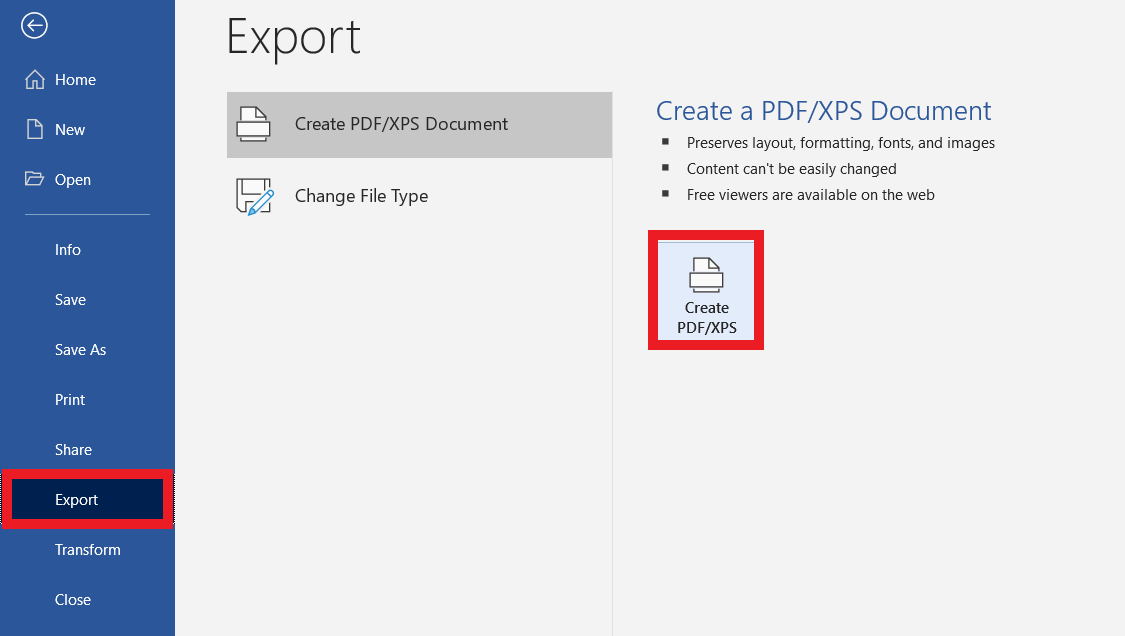
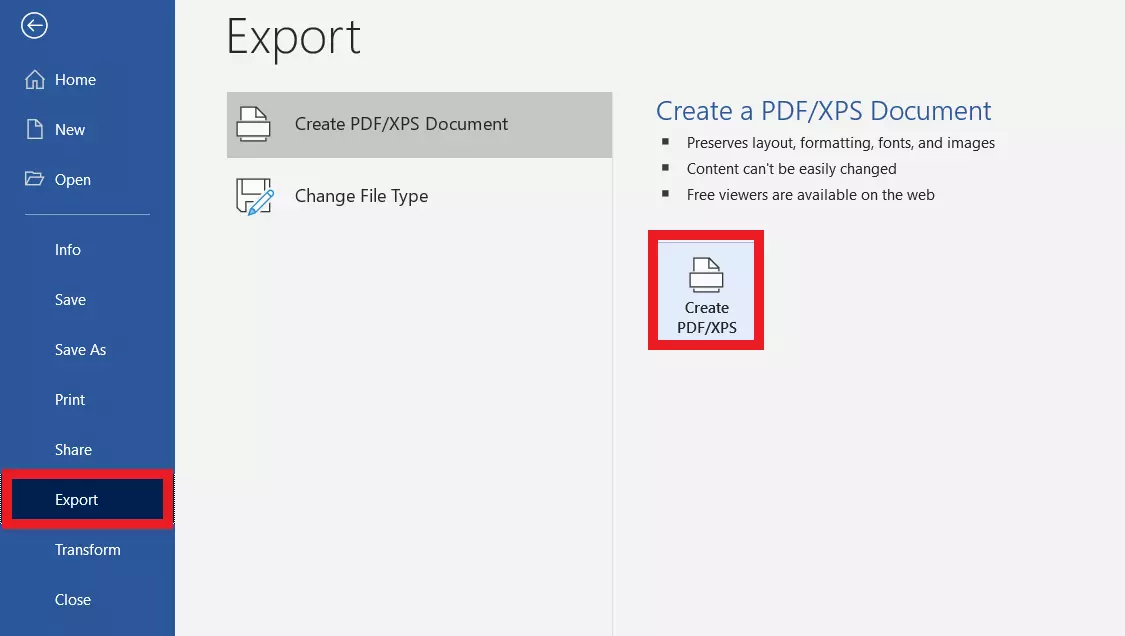
In Word, simply go to “Export” under “File” and save the ODT file as a PDF.
- Write perfect emails with optional AI features
- Add credibility to your brand
- Includes domain, spam filter and email forwarding