What is the cloud and how does it work?

A cloud uses physical servers in data centers to provide storage space, computing power, and software over the internet. Businesses and private users can access these resources independently of location and in encrypted form, adjusting them flexibly to their needs. Cloud computing therefore replaces fixed, on-premises IT systems with a flexible, scalable, and more efficient alternative.
Outsourcing storage and applications to the cloud—a term derived from the symbolic depiction of invisible IT infrastructure as a “cloud”—offers a high degree of flexibility. Resources can be scaled up or down as needed, providing the foundation for modern scalability.
Cloud computing has been around for decades, but it only gained real momentum with the rise of the internet. Today, professional cloud providers follow comprehensive security standards, implement zero-trust architectures, and operate data centers that comply with U.S. regulations such as HIPAA, CCPA, and SOC 2—significantly reducing earlier concerns about data privacy and security.
- Cost-effective vCPUs and powerful dedicated cores
- Flexibility with no minimum contract
- 24/7 expert support included
What can you use the cloud for?
Cloud services shift data, applications, and computing tasks to external servers instead of keeping them on local machines. This allows users to rent storage and processing power on demand—without purchasing or maintaining their own hardware. Many programs run directly in a web browser or app, eliminating the need for local installation.
Key use cases at a glance:
- Store, back up, and sync files across multiple devices
- Access software directly in the browser (SaaS) without installing it locally
- Scale computing power as needed (e.g., for analytics, development, or AI workloads)
- Collaborate with teams using cloud-based tools
- Automate backup creation and recovery
- Host websites, online stores, and web applications
- Run virtual servers, databases, or complete IT infrastructures
Cloud computing plays a central role in real-time collaboration. Many modern collaboration tools are cloud-based, enabling teams to work together regardless of location. Cloud platforms also provide the foundation for hosting websites, e-commerce stores, and applications, as well as operating virtual machines, databases, and development environments.
Another core function of the cloud is reliable data backup. Backups can be created and restored automatically, reducing manual effort and minimizing risk. Professional data centers rely on redundant storage systems and extensive technical and physical security measures to ensure high availability and round-the-clock access to data.
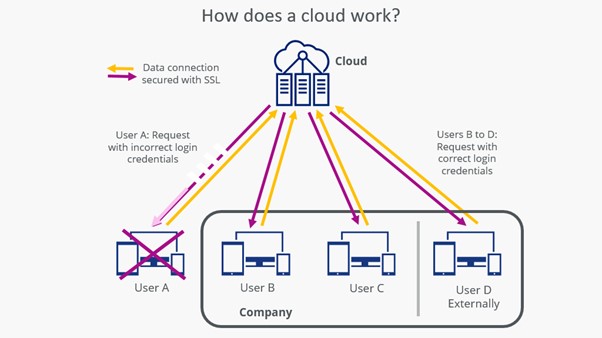
How does a cloud work?
At its core, the cloud functions similarly to a corporate network. Users log in with their credentials to access data and applications. The key difference is that cloud servers are not located on-site but hosted in professionally managed data centers. In these data centers, storage capacity, computing power, and memory are delivered in virtualized form and managed through automated control and security systems. Users connect via web interfaces, browsers, or dedicated applications—allowing them to manage files much like they would on a local hard drive and run software directly online.
What are the different types of clouds?
To select the model that best aligns with their IT infrastructure, companies need to understand the main types of cloud deployments. These models differ primarily in who manages the resources, how access is granted, and the level of flexibility and control they offer—ranging from tightly controlled internal environments to highly scalable, externally operated services.
Private cloud
When companies operate their own servers or dedicate exclusive resources to their employees, this is known as a private cloud. Data and applications are accessible only within the organization, which is especially important when handling sensitive information or data subject to U.S. regulations such as HIPAA, CCPA/CPRA, or industry-specific compliance requirements.
Private clouds provide a high degree of control, but they involve substantial administrative effort and higher costs, as maintenance, operations, and security remain entirely the company’s responsibility.
Public cloud
A public cloud is delivered over the internet and managed by a third-party provider. The provider handles infrastructure maintenance, security measures, system updates, and scalability. Organizations benefit from maximum flexibility and avoid the cost and effort of running their own hardware. Public cloud services are standardized, rapidly deployable, and particularly well suited for dynamic or fluctuating workloads.
Hybrid cloud
The hybrid cloud combines elements of both models. Highly sensitive or business-critical data remains on-premises or within a private cloud, while less sensitive applications and workloads run in the public cloud. This approach allows organizations to meet compliance and security requirements while still taking advantage of the flexibility and scalability offered by public cloud services.
How is data stored in a cloud?
Data in the cloud is managed much like files on a local hard drive, meaning it can be accessed, edited, moved, or deleted as needed. The difference is that access happens through web interfaces, apps, or synchronization clients that create a dedicated cloud folder on your device instead of using a physical drive. From any connected device, users can create folders, upload documents, modify files, or remove them. Modern cloud platforms also offer features such as automatic synchronization, file versioning, shared workspaces, and secure backups of databases, smartphones, and other endpoints.
Within the data center, information is encrypted and typically stored redundantly—often using distributed object storage systems. Data transfers between user devices and the cloud are protected through encrypted connections such as TLS. The cloud provider manages internal data organization, redundancy, and routine backup processes.
For providers with data centers in the United States, compliance depends on applicable federal and state regulations as well as industry standards, such as HIPAA, CCPA/CPRA, SOC 2, or NIST frameworks. These regulations define strict requirements for data protection, access controls, physical safeguards, and logging. As a result, stored data is protected through comprehensive technical and organizational measures and remains reliably available.
When does using a cloud make sense?
Whether adopting a cloud solution makes sense depends on several factors and cannot be determined solely by the amount of data involved. The key considerations are how flexible, secure, and cost-efficient the organization’s IT infrastructure needs to be. A thorough cost-benefit analysis should compare investments in hardware, maintenance, software licenses, personnel, and future capacity requirements with the recurring costs of cloud services.
With cloud solutions, expenses for maintenance, updates, security, and hardware upgrades are typically included in the service fees. The provider centrally manages the infrastructure and keeps it up to date automatically. This reduces the burden on companies to operate and secure their own servers or to purchase and maintain on-premises software licenses.
Many providers also offer a free entry option, such as limited storage plans or trial periods. This enables organizations to move initial workloads to the cloud and gain practical experience before transitioning larger or mission-critical systems.
However, cloud computing also introduces certain requirements. Access controls and security policies must be applied consistently, as multiple users and devices interact with shared resources. Clear role and permission structures, routine audits, and well-documented procedures are essential to meet data protection standards and regulatory compliance obligations.
Reviewer

Christian Heldmaier
Christian Heldmaier is an experienced online marketing and SEO specialist from Karlsruhe. He has been working as an SEO Manager at IONOS since July 2020.